
Leveraging LLMs to discover, build, and maintain product context
Written on September 9, 2026 by Patrick Bagley
TL;DR: A product manager's role is to navigate stakeholders and the team through ambiguity toward a desired outcome. Since every product space has unique challenges, there's no set of repeatable steps that guarantees success, but a constant thread for product managers is maintaining enough context to make the best decisions possible. Here are some ways product managers at Verdance leverage LLMs to manage product context.
Porta Antiporta on surfacing technical product context:
My work often involves reimagining how legacy systems can be improved. The challenge is that the context surrounding those systems quietly erodes over time as teams transition, contracts change hands, and the people who originally built or maintained a system move on. Handoff sessions help, but the downward spiral is vicious: information still gets lost and documentation goes stale. Eventually, the last team holding the bag is left piecing together how things actually work.
In the past, I'd spend the first weeks or months of a new engagement just building foundational understanding: what the products do, who they serve, what policies they're tied to, and where to find information worth trusting. It’s repetitive but necessary work, as each program comes with its own (mis)adventures and quirks.
LLMs have fundamentally changed how I approach this problem. Code is the ultimate source of truth for how a product behaves, and understanding how it works today yields more productive conversations about how it should work tomorrow.
Generating architecture documents and specifications from code
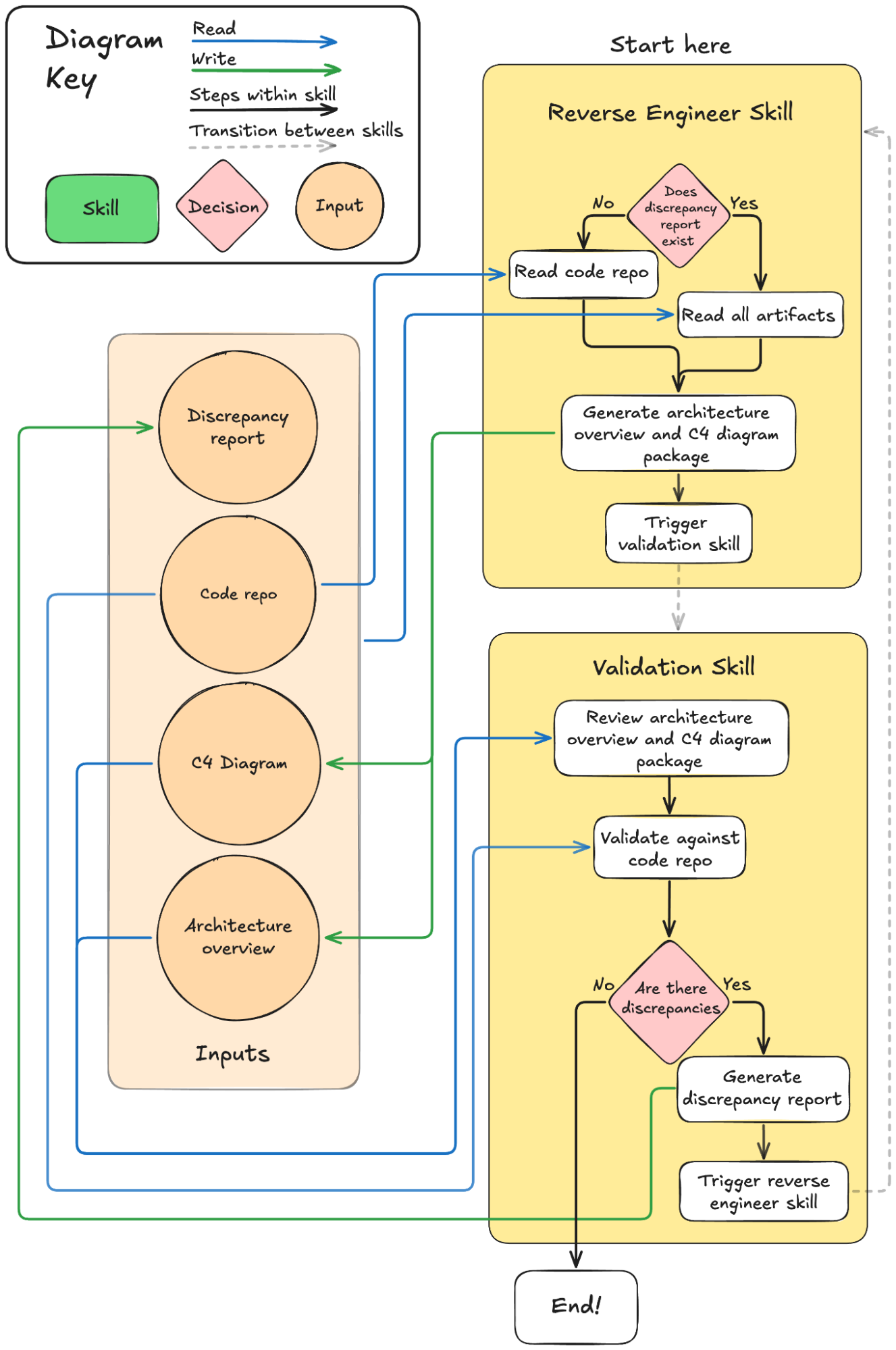
Using a coding agent layered on top of an LLM (Claude Code over Opus, or Open Code over Minimax running on Bedrock), I built and used a reverse engineering skill that points the agent at a code repository and generates an architecture overview and C4 diagram package. The output can be Mermaid or draw.io depending on the complexity and how clean the diagrams need to be.
That said, LLMs are fundamentally probabilistic and will make errors. So how can we increase our confidence in these overviews?
Validation through independent context
To manage that risk, I built a second validation skill that runs the process in reverse: it takes an architecture diagram and validates whether it accurately reflects the codebase. Critically, this runs in an independent and completely separate context, sometimes using a different foundational model, so it functions as an independent audit. It produces a report of discrepancies with assigned severity levels.
I then feed that validation report back into the architecture skill (in a fresh session) to confirm the errors and issue corrections. The updated diagrams go back through the validation skill again — across several iterations, we get progressively more confident in their accuracy.
For a PM inheriting a program with thin institutional knowledge, this kind of workflow compresses weeks of archaeology into something much more manageable and auditable.
As a side benefit, this process often reveals opportunities to improve the skills themselves.
Sadie on prototyping for stakeholder and engineering alignment:
I often work on teams inheriting products that don't come with the design documentation or team resources needed to hit the ground running on delivery quickly. Recently our team was asked to scope an extension of an existing feature that we didn’t initially develop and we had a week to deliver the LOE and project the impact of the feature extension. With no design documentation to work from, I used Claude Design to produce a clickable prototype to help ensure our assumptions matched stakeholder expectations. I took snapshots of the current user experience, combined them with the developer's code assessment, and iterated on a clickthrough prototype to bring to our stakeholders to ensure we were aligned on the experience we would be delivering as well as the LOE.
The prototype came together from four inputs: screenshots of the current user experience, a written summary of the developer's technical assessment, a written description of the recommended approach, and my own notes on where the flow was likely to lose users. The output was a single self-contained HTML file that opened in a browser at fidelity matching the live product and was ready to demo in the alignment meeting as a working artifact. Here are the steps I took to create the prototype:
Opened the live product and took screenshots of every page in the flow we were modifying, including the entry point, form pages, validation states, and results view
Wrote a short summary of the developer's technical assessment in my own words, focused on what could be reused and what the constraints were
Wrote a short description of the recommended approach, noting where the new flow reused existing components and where it introduced something new
Passed the screenshots, the technical summary, and the approach description to the LLM with a direction to match the existing product's visual style exactly rather than produce a polished redesign
Asked the LLM to build a single self-contained HTML file that showed the full flow end to end, including upload states, validation preview, correction interface, and results
Opened the output in a browser and clicked through it myself first, noting where the flow felt off or where the fidelity to the live product broke down
Iterated with the LLM by pointing at specific screens or interactions and describing what needed to change, one adjustment at a time.
Demoing the prototype during the LOE discussion made the alignment much more efficient. It answered questions the stakeholder would have struggled to talk through without a visual. She could see the difference between the initial release and the enhancements. The developer could point to specific features as we walked through them. We left the conversation with a day-one scope, a cut line for follow-ons, and additional feature ideas she raised on her own. Her willingness to raise them reflected trust in how we had assessed the feature and shaped the recommendation.
Patrick on automating documentation updates:
Throughout my career, user-facing documentation has been a necessary nuisance. I’ve often been unsure of how often these documents would be needed—if they’re needed at all—leading to a nagging question about how much time I should be putting into this work in the first place. Should I be editing legacy docs or product documentation to ensure they stay current? Did I remember all the legacy docs I needed to update? Which document serves as the source of truth, especially when context is scattered across multiple locations? Documentation can be a huge pain, and I’ve frequently wanted to do away with it entirely; after all, if the team is doing its job well, shouldn’t the product be intuitive enough to navigate without guidance? But, several factors complicate this ideal; first, no one is infallible, myself and my team included—occasionally, the first iteration of the features we deploy aren't as intuitive as we’d anticipated during initial design. Second, each user approaches the application with a unique perspective and set of expectations; while we strive for clarity, there will inevitably be users for whom the product’s flow doesn't align with their mental model. Additionally, the onboarding process for new team members or users can quickly become overwhelming in a larger product. Finally, within civic tech, the underlying laws, policies, and procedures that we’re supporting are frequently complex and convoluted, and users don’t always know all of them before they use our products. For these reasons, documentation remains a necessary tool in our toolkit.
Documentation as a part of your codebase
Yet, the lingering question remains: exactly how much effort should be dedicated to this? LLMs have proven to be a massive help in reducing the time I spend on documentation. I’ve developed a documentation skill that references my last user documentation entry, analyzes the current code, and drafts a markdown file based on the difference. Whenever an engineer merges into main, I simply pull the branch, run my agent to generate the initial draft (which I then read and edit!), and submit a merge request so the documentation lives with the code. This system doesn't just identify new features; it flags modified or deprecated functionality for removal in documentation as well. We aren’t writing The Lord of the Rings here, Gandalf isn’t shouting “you shall not pass” when your SSO fails (though, wouldn’t that be fun!)—it just needs to be a clear, navigable source of truth for the team and our users. Documentation takes a fraction of the time it used to take, it always matches the code that’s written, and it’s living with the code itself—if you have the code, you have the documentation! Now that the documentation lives with the code as markdown files, with minimal effort we can use a package to convert the markdown file (for us, we’re converting it to React) and surface these markdown pages on the front end of the product for our users.
What’s next
Within product management, we rely on the scientific method—testing and validating hypotheses—to confirm we’re navigating in the right direction as the problem space shifts and new information arises. These LLM implementations are merely our current iterations; we can’t predict how our landscape will evolve or identify every future capability needed to overcome new obstacles and cultivate product context, but we’re eager to learn, iterate, and share our findings along the way! Next up, we’re interested in continuing to explore how AI tooling has shifted the way we do our jobs; specifically, we want to take a deeper dive into how our outputs have changed, while our goal of faster iterations and feedback loops have stayed the same!